
Introducing Lakehouse Lens: Identify Databricks Governance and Security Gaps

Itai Weiss

A service from Climb that helps enterprises identify configuration gaps, review the evidence and plan remediation.
Business needs change. Data changes. And the environments that hold that data change with them.
A new team needs access to a dataset. A project introduces a new workload. Sensitive data is added to an existing environment, or a temporary permission is granted to meet a business deadline. Each change can be legitimate on its own, but over time, these changes can leave gaps between the controls an organization expects and the way its Databricks environment is actually configured.
That is why effective data governance requires more than defining policies and putting controls in place. Organizations also need a way to periodically assess their environments, understand where configurations may no longer align with expectations, and determine what needs attention.
For CIOs, CDOs, and governance leaders, this visibility is essential to maintaining confidence that data remains appropriately protected as the business evolves.
Lakehouse Lens, built by Climb, helps make that ongoing assessment practical. It provides a consolidated view of assessed Databricks governance and security configurations, highlights potential gaps, presents supporting evidence, and recommends remediation actions.
Rather than relying solely on initial configuration reviews or lengthy manual assessments, teams can use Lakehouse Lens to understand their current posture and focus their efforts on the areas that need attention.
Lakehouse Lens supports governance and security assessments. It does not independently certify regulatory compliance.
Is Your Databricks Workspace Aligned With Your Policies & Configured as Intended?
Lakehouse Lens helps leaders and platform owners check whether their Databricks workspace reflects their intended governance model and architecture. It brings configuration findings from eight assessment domains into one view, so teams can identify gaps, agree on priorities and repeat the review as the workspace changes.
Check how your governance model is implemented.
Your governance model depends on clear ownership and visibility into how data moves through the platform. Lens examines Unity Catalog settings/configuration, ownership and lineage configuration alongside governance settings for other workspace objects, so leaders can see whether the workspace supports the governance model their teams intended. That means reviewing:
- Where Unity Catalog is in use,
- How ownership is assigned,
- What lineage information is available for the objects those teams depend on, and
- How governance is configured for notebooks, dashboards and Git repositories.
Compare the workspace with your intended architecture.
Your team’s architecture defines how data is prepared for business use. Lakehouse Lens helps you review whether the workspace configuration reflects that design. This includes medallion patterns with bronze, silver and gold data layers, as well as how pipelines, jobs and dashboards are accessed.
Reassess the workspace as it changes.
Once Lens is deployed and authorized inside Databricks, your team can run scans on demand to review the current configuration, without arranging a months-long assessment engagement or transferring findings to a separate service.
Give leaders and engineers recommendations they can act on.
For each gap it identifies, Lakehouse Lens provides a recommendation alongside the technical steps needed to address it. This allows the CDO and platform engineer to review the same finding and agree on what to do next.
How Does Lakehouse Lens Assess Databricks?
Lakehouse Lens runs automated configuration checks in your Databricks workspace and presents the results with supporting evidence and recommended actions. It uses Databricks’ managed app runtime without requiring separate agents or an external SaaS account. Your team deploys the app and configures its access; the FastAPI backend performs the checks and the React frontend displays the findings.
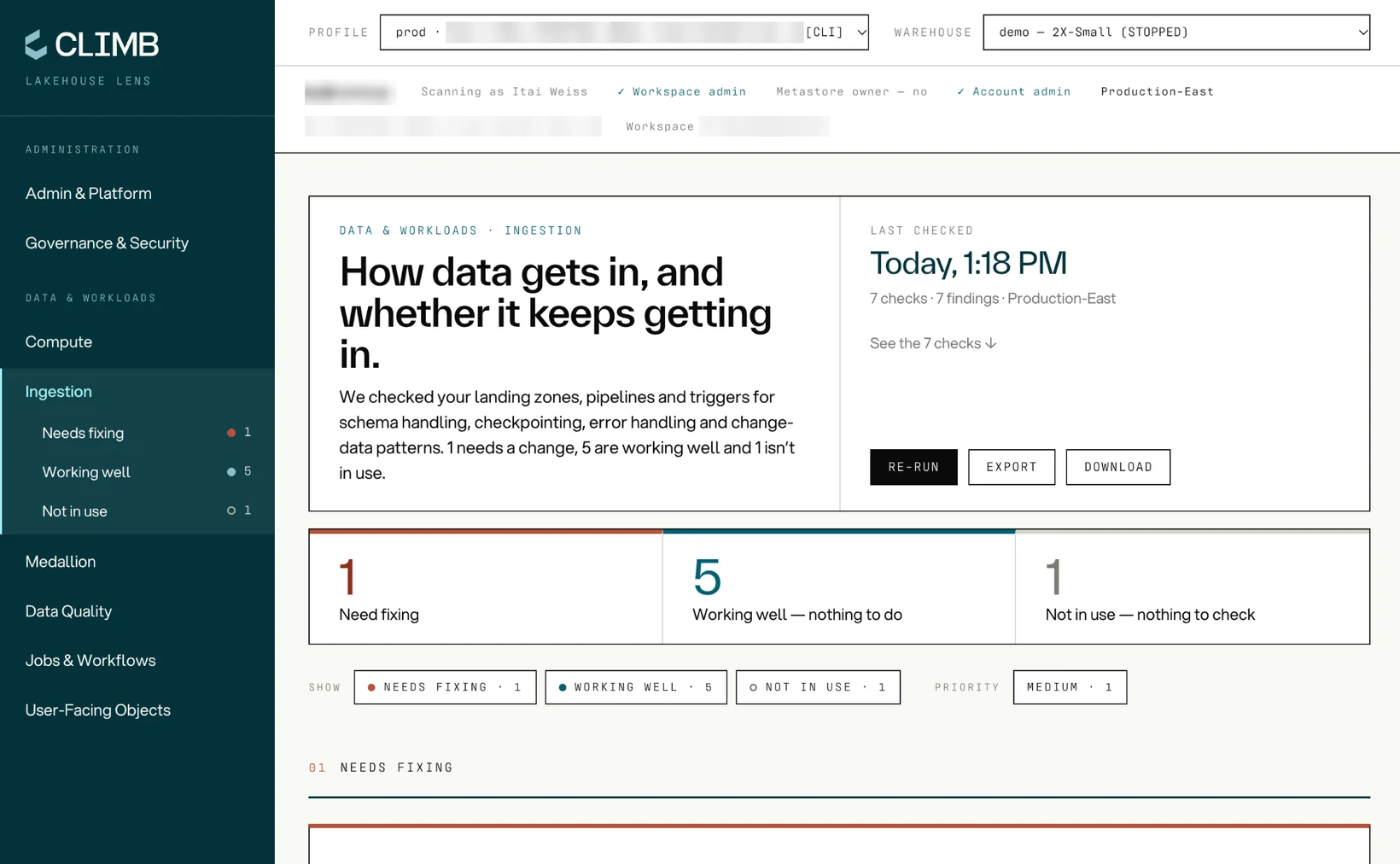
How Does a Scan Run?
When you choose a domain and click Scan, Lens runs probes concurrently and displays each finding as its check completes, allowing you to review results while the scan continues. If a probe fails, its error appears as a finding while the remaining checks continue to run.
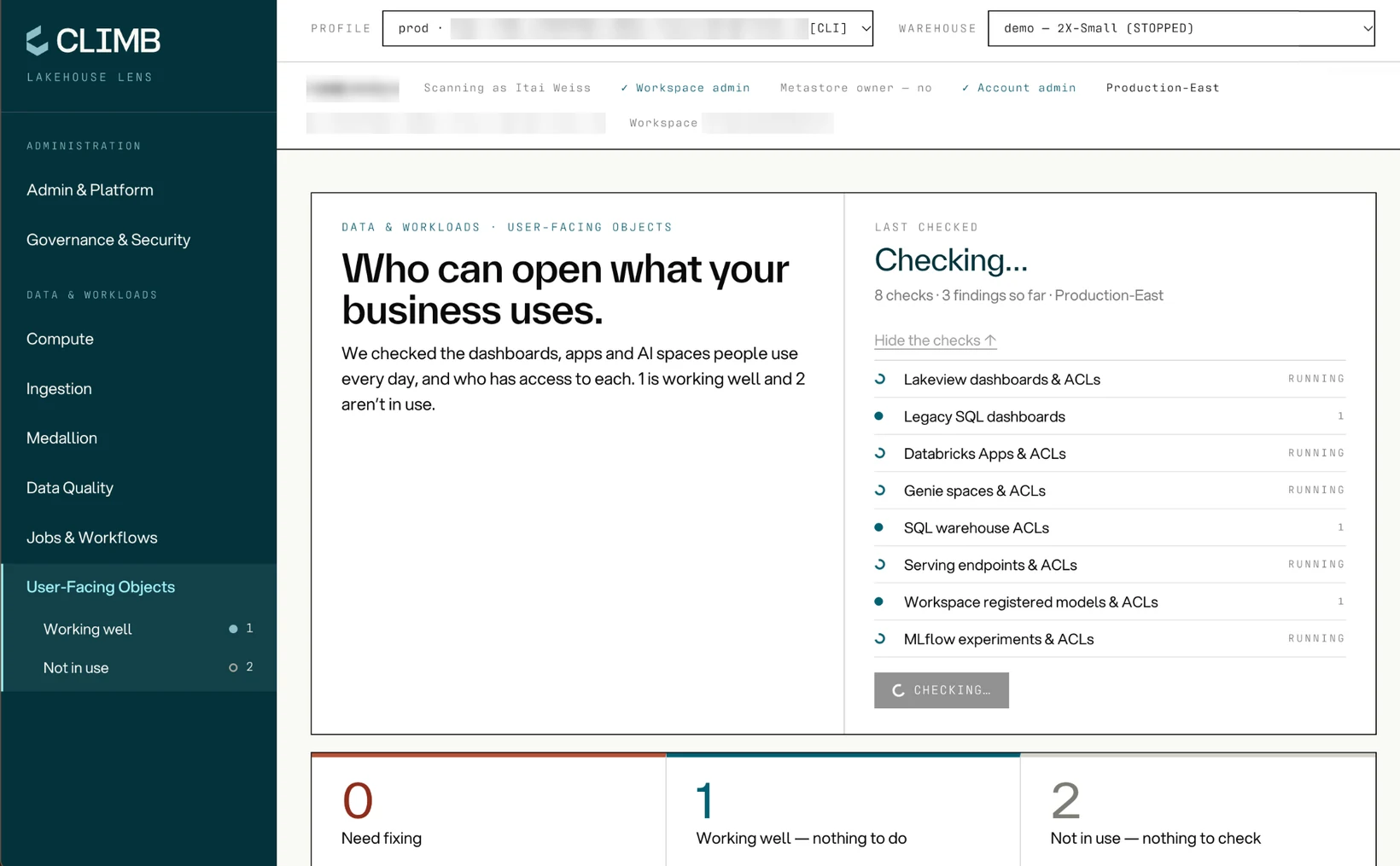
What Evidence Supports Each Finding?
For a completed configuration check, Lens records the observed value and compares it with a defined rule. It retrieves those values through the Databricks SDK first and direct REST calls where needed, automating checks a platform engineer would otherwise perform by hand. Reviewers can examine that evidence to understand the assigned status and recommended action.
How Are Findings Graded?
Each finding receives one of six statuses, helping your team understand whether the check confirmed the expected configuration, found a gap, did not apply or could not be completed.
| Status | What it means |
|---|---|
| Confirmed | The observed value meets the check’s criterion; no action is indicated for that check. |
| Gap Found | The check found a gap and recommended action. |
| Compliance Gap | The observed value falls short of a stricter baseline. Review whether that requirement applies to your organization. |
| N/A | The check does not apply to the assessed configuration. |
| Error | The check could not be completed. Review the error and rerun it after resolving the cause. |
| Insufficient Permission | The scan lacks the access needed to assess the item. Review the stated permission requirement. |
What Does the Databricks Assessment Cover?
Findings are grouped by 8 domains, making it easier to involve the people responsible for reviewing and resolving each issue.
| Domain | What it covers | Example check |
|---|---|---|
| Admin & Platform | Workspace administration and platform settings. | Token hygiene: personal access tokens with no expiry or a lifetime beyond the workspace maximum. |
| Compute | Compute configuration and controls. | All-purpose clusters without auto-termination, and whether cluster policies cover every cluster. |
| Governance & Security | Governance adoption, ownership and security configuration across Unity Catalog and other workspace objects. | Unity Catalog enablement and remaining use of the legacy hive_metastore. |
| Ingestion | How data enters the platform. | Error handling: ingestion jobs without automatic retries or failure alerts. |
| Medallion | How the workspace reflects the intended data layers. | Layer detection: which schemas and tables map to bronze, silver and gold, and what sits outside those layers. |
| Data Quality | Configured checks and controls for data quality. | Declarative Pipelines expectations coverage: pipelines running without data quality rules. |
| Jobs & Workflows | Job configuration and workflow organization. | Run-as identity: jobs that run as an individual user instead of a service principal. |
| User-Facing Objects | How dashboards and other user-facing objects are organized and governed. | Lakeview dashboards and their access lists: dashboards shared with individuals instead of groups. |
Once a gap is visible, the team responsible can review its evidence and decide whether a configuration change is needed.
Plan Remediation With Your Lakehouse Lens Report
Lakehouse Lens gives your organization a report it can use to prioritize remediation and coordinate the response. By presenting the evidence behind each finding alongside a recommended action, the report gives leaders and engineers a common basis for deciding what needs attention and how to address it.
| Report feature | How it supports your organization |
|---|---|
| Finding status and priority | Help teams distinguish confirmed results from gaps and checks that need further verification, then decide which findings to address first. |
| Observed configuration | Provides a record of what the scanner found, so reviewers can examine the basis for each finding during internal reviews or audit preparation. |
| Plain-language recommendations and technical steps | Help leaders understand the proposed response while giving engineers specific guidance for planning and carrying out remediation. |
| Excel export | Lets your team retain the assessment in a Unity Catalog Volume of your choosing and share the findings with the people responsible for reviewing and addressing them. |
Built to Respect Your Workspace’s Security Boundaries
Before running an assessment, security teams need to understand what the scanner can access, whether it changes the workspace and where the findings are stored.
Review configuration without changing it. Lakehouse Lens reads workspace settings and objects without creating, changing or deleting them, or granting access. Your team controls any remediation, while the app writes findings only when you choose to export a report to a Unity Catalog Volume.
Keep assessment findings within your Databricks environment. Lakehouse Lens runs as a Databricks App in your workspace, keeping scan data and findings within your Databricks environment. Findings remain available during the active session and are cleared when you close it; any report you export remains in the Unity Catalog Volume you selected. Lens does not maintain a findings database or send scan data or findings to Climb or another external service.
See the evidence behind each finding. Lens records the setting, count or access-control list returned by a check so your team can examine the evidence behind its assessment. If the check cannot establish a result, the finding reports that uncertainty explicitly.
Identify checks blocked by missing permissions. When the scan lacks the access needed to complete a check, Lens labels the finding “Insufficient Permission” and identifies the required role or capability. Making that limitation visible helps teams understand which items have been assessed and which still need to be checked.
Assess hardening against Databricks’ security guidance. Databricks’ Security Analysis Tool (SAT) evaluates configurations against security best practices. Lens uses that baseline for workspace hardening and data-exfiltration checks, helping teams identify settings that need review. It distinguishes Gap Found from Compliance Gap so teams can recognize requirements associated with stricter baselines and assess whether those requirements apply. A team outside the stricter baseline may document a decision to accept the configuration, provided it still meets the organization’s applicable obligations.
Get a Lakehouse Lens Discovery Assessment From Climb
Engage Climb for a Lakehouse Lens discovery assessment to identify governance and security gaps in your Databricks configuration. Climb works with your team to identify governance and security gaps, interpret the findings and prioritize remediation. You receive a report with supporting evidence, recommendations and technical next steps to help you plan the work.
Climb helps organizations build and deploy AI and machine learning use cases under strict security and compliance requirements. Drawing on extensive experience in healthcare, financial services and other regulated industries, Climb helps teams establish the data access, governance and security controls those use cases need in production. Get in touch with our experts to explore how you can achieve better outcomes with your data and enable AI/ML use cases.
Disclaimer: Lakehouse Lens surfaces configuration findings and recommendations; it is not a certification, audit opinion, or guarantee of compliance with any standard.

Context: The Foundation for AI at Scale in Life Sciences
AI will materially change how life sciences businesses operate, and most of that change is still ahead. The organizations that lead are reimagining core processes as digital-native and investing in the data and context foundations those processes run on.
 Jacob Larson

Climb Secures Growth Investment from RLH Equity Partners
Climb secures growth investment from RLH Equity Partners to expand Climb’s Databricks partnership, advance healthcare, life sciences and financial services solutions, and accelerate its agentic delivery operations framework.
 David Close

The Climb AI Maturity Framework
Six pillars for taking AI systems to production: definition, evaluation, security, reliability, cost, and oversight. Read Climb's AI Maturity Framework.
 Jim Rosser